Purpose
To establish mechanisms to:
- monitor and compare actual achievements against those planned;
- to provide a forecast for the project objectives and the project’s continued viability;
- to control any unacceptable deviations.
Definitions
Progress
A measure to compare the actual achievement against the planned level of achievement of the objectives of a plan; It can be monitored for the Project Plan, Stage Plan and Work Package level.
Progress controls
The controls put in place to ensure that each level of the Project Management Structure can control the level below.
Tolerance
The deviation allowed for each of the six variables: Benefits, Cost, Quality, Risk, Scope and Time, without escalating the deviation to the next level of management. Tolerances are defined for each level in the Project Management Team.
| Tolerance area | Project level | Stage level | Work Package level | Product level |
|---|---|---|---|---|
| Benefits Define targets in terms of ranges. |
Business Case | NA | NA | NA |
| Cost +/- amounts of planned budget. |
Project Plan | Stage Plan | Work Package | NA |
| Quality Define targets in terms of ranges. |
Project Product Description | NA (Note 1) | NA (Note 1) | Product Description |
| Risk Limit aggregated value of risks to a % of budget. Limit on any individual threat. |
Risk Management Strategy | Stage Plan (Note 2) | Work Package (Note 2) | NA |
| Scope Permitted variation of the scope of the project. Use MoSCoW. |
Project Plan (Note 3) | Stage Plan (Note 3) | Work Package (Note 3) | NA |
| Time +/- days, weeks, months, … on target completion dates. |
Project Plan | Stage Plan | Work Package | NA |
Note 1: Quality tolerances are not summarily defined at the Stage or Work Package level, but are defined per Product Description within the scope of the plan.
Note 2: More specific stage level risk tolerances may be set by the Project Board when authorising a stage or by the Project Manager when commissioning Work Packages, especially from external suppliers.
Note 3: The scope of a plan is defined by the set of products to be delivered. Scope tolerance should be in the form of a note on or reference to the product breakdown structure for the plan. Scope tolerance at the stage or Work Package level is of particular use if applying a time-bound iterative development method such as Agile.
Exception
A situation where it can be forecast that there will be a deviation beyond the agreed tolerance levels.
Approach to Progress
The progress control tools used in PRINCE2 are:
- Delegating authority from one level of management to the level below.
- Dividing the project into management stages and authorising the project stage by stage.
- Progress reports and reviews, both time driven and event driven.
- Raising exceptions.
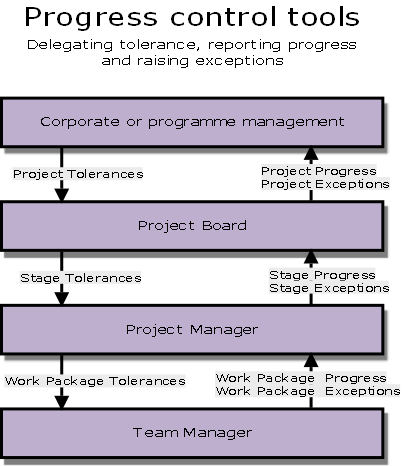
Delegating authority
Authority is delegated from each level to the level below in the form of tolerances
Management Stages
Are partitions of the project with management decision points.
The Project Board authorises each stage separately. In that way it can closely monitor the project progress in time.
Reporting Progress
Time driven reports take place at predetermined periodic intervals:
- Checkpoint Reports: show the progress of a Work Package for the Project Manager.
- Highlight Reports: show the stage progress for the Project Board.
Event driven reports take place when a specific event occurs:
- End Stage Report: Compare stage performance to Stage Plan.
- End Project Report: Compare project performance to Project Plan.
Raising Exceptions
Work Package level exceptions: The Team Manager raises an issue
Stage level exceptions: Issue Report / Exception Report. If requested, an Exception Plan.
Project level exceptions: Exception Report. This level of exception has to be reported to the Corporate/Programme Management by the Project Board.
Project Board controls
Authorisations:
- Initiation
- Project
- Each Stage
- Project Closure
Progress updates:
- Highlight reports - regular progress reports
- End Stage reports
Exceptions and Changes:
- Exception Reports - if expected to go out of tolerance
- Issue Reports - if out of tolerance or in need of advice
Project Manager controls
Authorisations:
- Agreeing and authorising work - Work Packages
Progress updates:
- Checkpoint reports - regular reports from Team Managers
Exceptions and Changes:
- Registers and Logs - compare plans with actuals; deal with issues and risks or escalates
At the end of each Management Stage, the Project Board:
- Checks if the project is still viable
- Checks overall progress by looking at the Project Plan
- Reviews the End Stage Report and the next Stage Plan
- Decides whether to continue on the next stage or not
- Commits resources and delegates authority for the next stage.
Technical Stages:
- Specialist work is done in technical stages
- Usually typified by the use of particular set of specialist skills or release
- Technical Stages can overlap, but Management Stages cannot
- A Technical Stage can span a management stage boundary.
The use of Management Stages is mandatory in PRINCE2.
The number of stages is flexible and is a process of balancing the:
- Planning horizon
- Key decision points
- Amount of risk in the project
- Amount of control required
- Confidence of the Project Board and the Project Manager.
The length of stages depends on the:
- level of risk
- Complexity
- Planning horizon
- Technical stages.
The Project Manager monitors and controls the Controlling a Stage process
- Use the plans (Project, Stage and Team plans) as baseline
- Receive Checkpoint Reports from Team Managers with progress information on Work Packages.
- Use other management products for review and control:
- Daily Log
- Issue Register
- Product Status Account
- Quality Register
- Risk Register
Capturing and Reporting lessons:
- Lessons Log
- Lessons Report.
Roles and Responsibilities
Corp. Or Prog. Mgmt
Provide project tolerances via Project Mandate.
Review and make decisions on Exception plans when project-level tolerances are forecast to be exceeded.
Executive
Provide stage tolerances.
Ensure business progress.
Make decisions on Exception Plans when stage-level tolerances are forecast to be exceeded.
Recommend actions to the Corporate or programme management if project tolerance is forecast to be exceeded.
Senior User
Ensure progress remains consistent from the user perspective.
Senior Supplier
Ensure progress remains consistent from the Supplier perspective.
Project Manager
Authorise Work Packages.
Monitor progress against stage plans (and project plan).
Produce Highlight, End Stage, End Project and Lessons Reports.
Produce Exception Reports (either stage or project level).
Maintain project registers and logs.
Team Manager
Agree on Work Packages.
Inform Project Support on completed quality activities.
Produce Checkpoint Reports.
Notify Project manager on any forecast deviation from Work Package tolerances. Raise issues.
Project Assurance
Verify Business Case against external events and project progress.
Verify changes to Project Plan for any impact on the needs of the Business or Business Case.
Confirm stage and project progress against agreed tolerances.
Project Support
Assist in creation of Reports.
Assist Project Manager in maintaining Issue Register, Risk Register and Quality Register.
Management products
Open a register or log to see its purpose, composition, derivation, format and quality criteria.